Overview
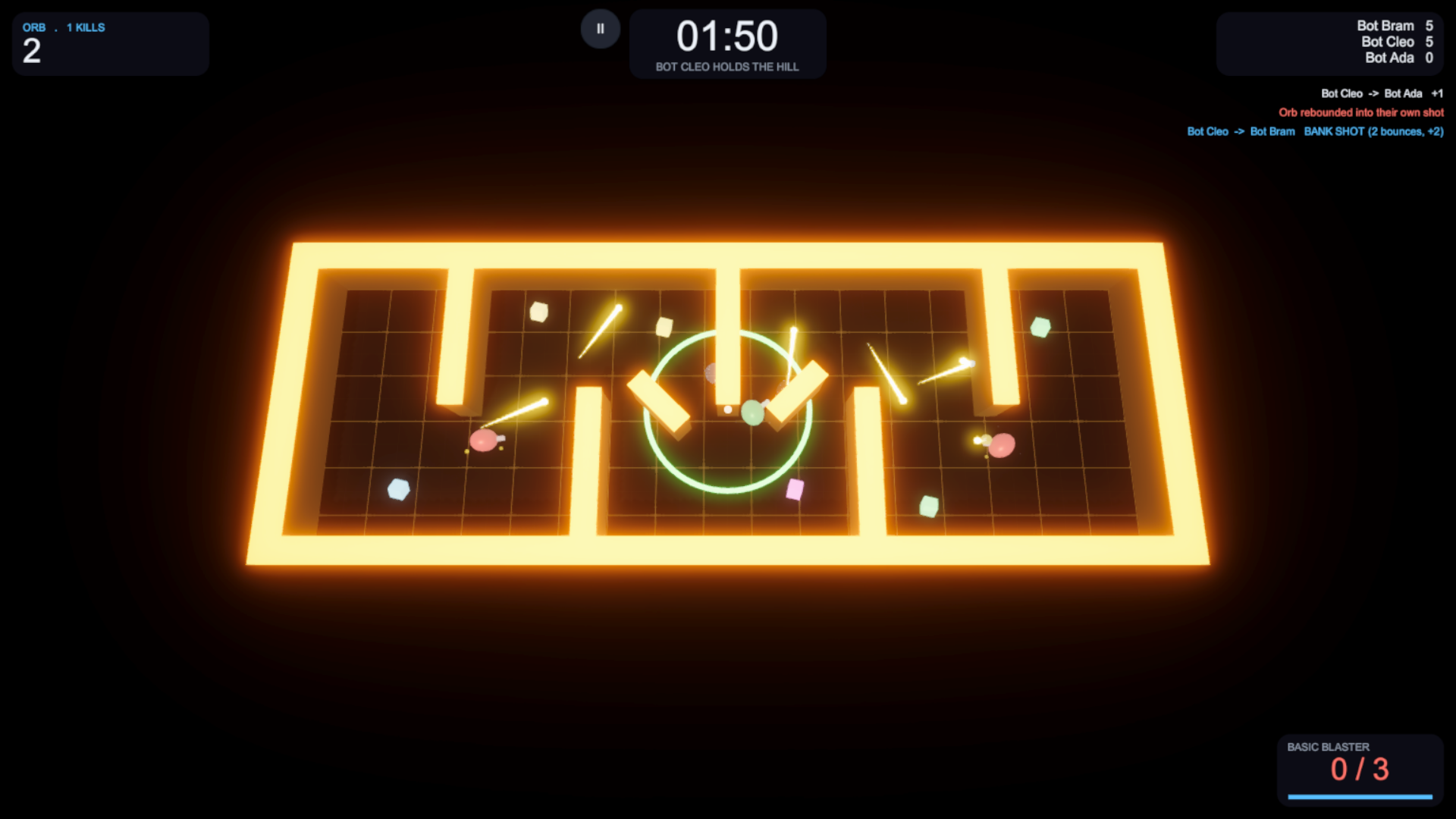
Ricochet Arena is a small, complete multiplayer arena shooter built on Unity 6 and Photon Fusion 2. Two to eight players, or bots, drop into a compact arena as orbs with a barrel. Bullets bounce off walls up to five times and stay in play for seconds, so the arena fills with hazards and most of the skill is in bank shots, and in not walking into your own. A bank-shot kill is worth double. A default match lasts sixty seconds and the highest score wins.
The host decides everything: clients send input only. Gameplay rules live in a Fusion-free core assembly covered by unit tests, and every weapon, map, mode and colour is a ScriptableObject. Play the web demo to try it.
Play in one click
Practice vs Bots runs a whole match offline through Fusion's single-player mode. No App Id.
Host-authoritative
Clients cannot claim hits, kills, ammo or score. Prediction keeps it responsive.
Ricochets
One pure stepper drives bullets, the aim preview and the bots, so all three agree.
Content
4 weapons, 6 modes, 4 maps, 4 power-ups. Add more with no code.
Bots
Three difficulty levels. They aim with the real projectile simulation and pathfind to pickups.
Every platform
Mouse, gamepad and twin-stick touch with safe areas. Desktop, Android, WebGL.
Headless host
One command-line flag turns a desktop build into a dedicated server.
Tested
127 EditMode tests and PlayMode tests that play whole matches, including a real two-peer one.
Requirements
| Item | Version | Notes |
|---|---|---|
| Unity | 6000.0+ | Universal Render Pipeline with HDR on (for bloom) |
| Photon Fusion 2 | 2.1+ | Free, not included: Photon does not allow redistribution. Import it from the Asset Store or photonengine.com. |
| Photon App Id | Free, from the Photon dashboard. Online play only; Practice works without one. | |
com.unity.inputsystem | Installed by default in Unity 6 templates | |
com.unity.test-framework | Optional For the included tests |
No TextMeshPro and no third-party art: the visuals are generated from code and data, and the sounds are synthesised.
Quick start
- Import Photon Fusion 2 Before or after this package. If Ricochet Arena comes first, a notice window says Fusion is missing; it closes on its own once Fusion is in.
- Run the Setup Wizard opens automatically. It registers
RicochetArena.Runtimewith Fusion's weaver and takes your Fusion App Id. - Play offline Open
Scenes/Arena_Menu, press Play, then PRACTICE VS BOTS. A full match against bots, no App Id. - Play online Make a standalone build (
Arena_Menufirst in Build Settings; Generate Missing Assets sets that up), run it, and join it from the Editor.
RicochetArena.Runtime must be listed in NetworkProjectConfig › Assemblies To Weave, or every
[Networked] property quietly stops replicating: players move, but shots and scores never sync. The
Setup Wizard adds it; reopen it if you renamed the assembly.
To test two players you need two processes: the Editor plus a standalone build, or two builds. gives you one to run alongside the Editor.
Controls
| Keyboard & mouse | Gamepad | Touch (automatic on mobile) |
|---|---|---|
| WASD move, mouse aim, left click fire | Left stick move, right stick aim, RT / RB fire | Left stick move; right stick aim, release to fire (drag far out and release to cancel) |
| R ready, Esc pause, F3 network overlay | A / Start ready, View pause | On-screen buttons, II or Android back to pause |
To try the touch controls in the Editor, select ArenaApp in the menu scene and set Input Mode
to Touch.
The match flow
Create Match (or Practice) → the arena loads → the lobby shows the room code → others find the match in the browser, or join with the code → everyone presses Ready → three-second countdown → sixty-second match → final-shot replay → results and a map vote → back to the lobby on the winning map. The host can add bots in the lobby (+ BOT) at any point; they arrive ready.
Quick Match joins the fullest open match that still has a seat, or creates one. The Region selector pins a Photon region or lets Photon pick the best ping. JOIN CODE is the private-match flow: share the code, skip the browser.
The pause menu holds volume, graphics quality, fullscreen, camera shake and Reduce Motion, saved to PlayerPrefs. A networked match cannot stop for one player, so pausing holds your orb still while the match carries on.
What is in the package
Assets/RicochetArena/
├── Scripts/
│   ├── Core/            Pure gameplay logic and every definition type. No Fusion. Unit tested.
│   └── ...              Networking, Match, Players, Weapons, Projectiles, Maps, UI, Effects, Audio
├── ScriptableObjects/   Weapons, maps, modes, player visuals, sound bank, UI theme, content registry
├── Prefabs/             Player_Orb, Projectile_Basic, Pickup_Weapon, MatchController
│   └── UI/              One prefab per screen. Restyle the game here.
├── Scenes/              Arena_Menu and one scene per map (generated from map data)
├── Settings/            Post-processing profile (bloom, ACES, vignette)
├── Editor/              Setup wizard, generator, validator, map authoring, build tools
├── Tests/               EditMode and PlayMode tests. Safe to delete.
└── Documentation/       Quick start; README.md is the full developer guide
Assemblies
- RicochetArena.Core
- Pure logic and all ScriptableObject definitions. No Fusion, no MonoBehaviours.
- RicochetArena.Runtime
- The networked and presentation layer. Woven by Fusion, compiled only when Fusion's
FUSION2define exists. - RicochetArena.Editor
- Setup wizard, project generator, validator, map authoring, build tools. Gated on
FUSION2. - RicochetArena.Setup
- Editor-only and Fusion-free: the "Fusion is missing" notice.
- RicochetArena.Core.Tests / PlayModeTests
- EditMode unit tests, and PlayMode tests that play whole matches.
Networking
The project uses Fusion's Host mode: the host holds state authority over every networked object, and a
client's entire contribution to the simulation is a PlayerInputData struct (move, aim and two buttons).
Damage, kills, ammo, health, score, the match clock and respawns are all decided by the host. Clients predict their
own orb and ammo, and Fusion corrects them when they guess wrong.
| Thing | Who decides | Replicated as |
|---|---|---|
| Match state, phase end tick, config | Host | [Networked] on MatchController |
| Score, kills, deaths, accuracy | Host | NetworkArray<PlayerScoreEntry> on Scoreboard |
| Position, aim | Host (client predicts its own) | NetworkTransform, [Networked] on PlayerAim |
| Health, shield, spawn protection | Host | [Networked] on PlayerHealth |
| Ammo, reload tick, fire cooldown | Host (client predicts) | [Networked] on Weapon |
| Projectile direction, bounces, expiry | Host (all peers predict motion) | [Networked] on Projectile |
| Name, colour, ready, map vote | Host, on client request | [Networked] + one RPC each |
What uses an RPC
- Announcements, host to everyone
RpcAnnounceDamage,RpcAnnounceKill,RpcAnnounceRespawn,RpcAnnounceCollected. Each raises the matchingGameEventsevent on every peer for the kill feed, hit marker and sounds. The state itself still replicates as properties; the RPC carries only the moment.- Requests, client to host
RpcReportProfile(name and colour, re-sanitised on arrival),RpcSetReady(only in the lobby),RpcVoteMapandRpcRequestReturnToLobby(only on the results screen). Each is honoured only when it is legal.
Muzzle flashes and ricochet sparks are not RPCs: Weapon and Projectile increment counters that
each peer watches with a ChangeDetector, so a bouncing bullet is not a burst of messages.
The match clock
There is no local countdown anywhere. MatchController replicates a PhaseEndTick and every peer
computes the remaining seconds from it, so two clients on the same tick always see the same second. When the clock
hits zero, combat stops everywhere at once and a bullet still in flight cannot score.
Collision and lag
- No Rigidbodies. Players and projectiles are kinematic and move in
FixedUpdateNetworkwith sphere casts against static geometry, which replays cleanly during resimulation. - Projectiles are simulated on every peer from the replicated direction rather than interpolated, because interpolation cuts the corner at a bounce. Damage and despawn stay host-only.
- A late input packet replays the last input, so a hiccup reads as continued motion rather than a dead stop.
- Orbs block each other by default;
MovementDefinition.CollideWithPlayersturns it off.
Reconnecting
A client whose session ends with a timeout or an error (a phone backgrounding the app, a network blip) rejoins the
same room on its own: three attempts, 1, 3 and 5 seconds apart, while the menu shows Reconnecting.... Every
join passes a per-process PlayerUniqueId, so the player gets the same PlayerRef
back, with their score, kills, deaths and team. A session the host closed is not retried.
Projectiles and ricochets
ProjectileStepper.Step sweeps a sphere forward. A player hit stops it; a wall hit reflects it off the
collision normal until the ricochet budget is spent. A bounce never grants extra range, and anything wedged in a
corner is retired instead of spinning.
| Basic Blaster | Value | Why |
|---|---|---|
Speed | 18 m/s | Slow enough that a bullet is a hazard you navigate, not a moment |
MaxRicochets | 5 | Keeps a bullet in play for two or three seconds |
LifetimeSeconds | 5 | Headroom, so the ricochet budget retires the bullet, not the clock |
Damage | 100 vs 100 health | Reads as a one-shot kill |
MaxRicochets is where the game's character lives: 1 gives you a conventional shooter, 8 a pinball table.
On the final bounce a weapon either expires on the next wall hit (default) or right after the last bounce
(ExpireAtLimit).
The aim preview
BouncePreview draws where your next shot will go, including its first two bounces
(PreviewBounces). It calls the same ProjectileStepper.Step the simulation runs, so the line is
a truthful prediction, not a parallel implementation that can drift. It is local only, never replicated, and hides
itself when the magazine is empty.
Scoring
A direct kill is worth 1; a kill after any number of bounces is worth 2. The winner is decided on score, then kills,
then fewest deaths. Without the split the best strategy is shooting point-blank, which ignores the mechanic the game
is built on. Both values are fields on the GameModeDefinition (DirectKillScore,
RicochetKillScore); ScoreTarget ends a match early (0 disables it). The kill feed calls out
BANK SHOT (2 bounces, +2).
The reload mechanic
The magazine holds three rounds. A one-second reload cycle restores exactly one round, starts as soon as the magazine drops below capacity, and restarts while it is not full. Firing never cancels a cycle, and there is no reload button. Tap once a second and you fire forever; dump all three and you wait a cycle per round.
Each round is a pip orbiting the orb (AmmoPips), and the pip being reloaded grows across its cycle, so
everyone can see when an opponent is empty. It is all tick arithmetic in AmmoMagazine, so a predicting
client and the host agree exactly on when the next round arrives.
Final shot, map vote and spectating
- Final shot
- The results wait for a three-second replay of the last kill, its path drawn in gold with a ghost bullet. The host records the real path in a small
NetworkArrayonMatchController, so every peer replays what actually happened. Skip skips it. - Map vote
- The results screen offers REMATCH and the next two maps in the registry, with live counts. Most votes wins; a tie or no vote is a rematch. A new map loads inside the running session via
Runner.UnloadScene/LoadScene; players and scores carry over. - Spectating
- A player eliminated in a mode without respawns follows their killer, then cycles through the survivors with click, tap or gamepad A / RT. Purely local presentation.
Content
| Shipped | |
|---|---|
| Weapons | Basic Blaster, Repeater, Scatter (5 pellets), Railgun (8 bounces). The host picks one; pickups swap it. |
| Modes | Duel, Deathmatch, Team Deathmatch, Last Man Standing, Gun Game, King of the Hill |
| Maps | Crossfire, Gauntlet, Pinwheel, Foundry, each with its own neon theme, spawns and pickup spots |
| Power-ups | Health (+50), Shield (absorbs the next hit), Speed (×1.4 for 6 s), Bounce+ (+2 ricochets for 6 s) |
| Bots | Easy, Normal, Hard |
A new weapon
- Create .
- Fill it in Id, magazine size, reload cycle, fire rate, and the projectile block (speed, damage, radius, ricochet budget, limit behaviour, lifetime).
- Projectile Point Projectile Prefab at
Projectile_Basic, or a prefab of your own with aNetworkObject,NetworkTransformandProjectile. - Register Add it to
ScriptableObjects/GameContentRegistry. It appears in the menu, in map pickups and on Gun Game ladders.
No code. For a genuinely different behaviour (homing, laser, grenade), subclass or replace Projectile on a
new prefab.
A new map
A MapDefinition holds the whole arena as data: size, walls (boxes with a centre, footprint and yaw), spawn
points, pickup spots, the hill, the neon theme and the camera framing. One generator turns any definition into a
scene; there is no per-map code.
- Create . Set a unique
MapIdand aSceneName. - Layout Fill in Size, Obstacles, Spawns (add far more than the player count), Pickups, Theme and Camera.
- Register Add it to the
GameContentRegistry. - Generate creates the scene and materials and updates Build Settings.
Authoring in the scene view: open the arena scene and use . Move, rotate and scale them (a wall's height is its Y scale), then . The round trip is lossless: baking an untouched scene leaves the asset unchanged.
Set GenerateSceneFromLayout to false and the generator never touches it. Put bounce surfaces on the
ArenaWall layer, leave the floor on Default, and add a MapContext with
SpawnPoint children.
A new game mode
- Kind Add a case to
GameModeKind. - Rules Implement
IGameModeRules:AllowsRespawn,ProgressTowardsTarget,ResolveOutcome, and optionallyTeamCount,EndsWhenOneAlive,OnPlayerKilled,OnTick. - Factory Return it from
GameModeRulesFactory.Create. - Asset , then add it to the registry.
MatchController owns phases, timers and replication and asks the rules what they mean. The six shipped
rule sets in IGameModeRules.cs are worked examples: Team Deathmatch uses TeamCount = 2,
Last Man Standing EndsWhenOneAlive, Gun Game OnPlayerKilled, King of the Hill
OnTick.
A new player appearance
: a unique
VisualId, colours, and optionally a body mesh override or a cosmetic prefab. Add it to the registry and
it appears as a colour swatch in the menu. Only the id crosses the network.
Replacing the orb with your own character
Everything visible lives under Player_Orb › Visuals; the 0.5 m sphere collider on the root and
MovementDefinition.Radius are what the game plays with.
- Per appearance
- On a
PlayerVisualDefinition, set Cosmetic Prefab to your model and Body Mesh Override to an empty mesh to hide the sphere. - One model for everyone
- Put your model under
Prefabs/Player_Orb › Visualsand pointPlayerVisual › Body Rendererat its main renderer, so it keeps the player or team colour. Parent the weapon or upper body toBarrelPivot, whichPlayerAimrotates. - Size
- Scale the root
SphereColliderandMovement_Orb › Radiustogether, and raise the orbit radius onAmmoPips.
Drive animation from PlayerMovement.CurrentVelocity and PlayerAim.WorldAimDirection, both
readable on every peer. Set PlayerMotionFx › Max Stretch to 0 unless you want the character to squash.
More players
Set MaxPlayers on the mode and map definitions, and make sure
NetworkProjectConfig › Simulation › Player Count is at least that. Nothing in the project has a "player
one"; the scoreboard holds up to 16.
Bots
BotBrain sits dormant on every Player_Orb. A bot is a player with a synthetic
PlayerRef instead of a connection, and it produces the same PlayerInputData a human sends, so
the scoreboard, teams and HUD work unchanged.
- Aim: it sweeps candidate directions through the real
ProjectileStepperand fires the first whose path reaches its target. That is why it banks shots. - Difficulty: the host picks BOTS EASY / NORMAL / HARD in the lobby. Each is a
BotSkillpreset onPlayer_Orb › BotBrain(aim error, think interval, directions tested, whether it detours for pickups). Easy tests 6 directions, Hard 48. - Movement: onto the hill in King of the Hill; to a useful pickup if it is closer than the fight; otherwise it orbits its target at
PreferredRange. Pathfinding is A* over a grid built from the arena colliders.
Look, sound and UI
- The look
- Nothing is imported. Walls are a dark body with an overbright cap strip, the floor emits a procedural grid, and
Settings/ArenaVolumeProfile(ACES, bloom, vignette) makes it glow. Each map'sLayout › Themesets its glow, grid, light and background colours. - Sound
ScriptableObjects/SoundBankmaps eachArenaSoundto a clip. Empty entries fall back to tones synthesised at runtime, so dropping in real clips is a pure content change.- UI
- Plain uGUI prefabs in
Prefabs/UI, one per screen, with the built-in font. List rows come from the disabled…Templatechildren: restyle the template and every row follows. Rounded panels come from one nine-sliced sprite; each Image sets its radius with Pixels Per Unit Multiplier. - Motion
- Screens crossfade, buttons respond to hover and press, values punch when they change, orbs squash, recoil, flash and shatter. Every duration is an Inspector field. Reduce Motion in Settings turns it all off, and starts on when Android's "Remove animations" is on.
- Strings
- Every string composed at runtime (clocks, kill feed, outcomes) comes from
UIText, one class of writable fields with indexedstring.Formatplaceholders, ready for a localisation layer.
regenerates Prefabs/UI
from code and discards your edits to them. It asks first.
Gameplay raises events and presentation listens: AudioService and EffectPresenter subscribe
to GameEvents, and no projectile, weapon or player holds an audio source or a particle system.
Mobile
Touch is a second input source that produces the same PlayerInputData, so a phone player and a mouse
player are indistinguishable to the host. ArenaApplication.InputMode is Auto (touch on mobile),
KeyboardAndMouse or Touch.
- The right stick aims while dragged and fires on release, which rewards timing each shot against the reload cycle.
- The sticks are uGUI widgets, so multi-touch works and they are drivable with a mouse in the Editor.
SafeAreaFitterkeeps the HUD and sticks clear of notches and home indicators. Landscape is enforced.- The sticks only appear while the match is live.
Android builds work as-is. Nothing in the code is platform-specific, so iOS should build the same way, but it has not been tested. A device reaches a host through the Photon cloud; there is no LAN-only path.
Builds
Headless dedicated host
writes a desktop build to
build/HeadlessHost/. Launch it with a room code:
RicochetArenaHost.exe -batchmode -nographics -arenaHost myroom [-arenaMap id] [-arenaMode id] [-arenaBots n] [-arenaDuration seconds] [-arenaRegion eu]
It runs Fusion in Server mode, so there is no host orb in the arena. Players join with JOIN CODE
myroom or from the browser. Bots wait until a human joins, and the process exits when the session ends,
so a supervisor can restart it.
Web demo
builds a practice-only WebGL version to
build/WebDemo and an itch.io-ready zip. It needs the Web Build Support module.
- The menu hides the match browser and never joins the Photon lobby; Fusion's single-player mode runs the host simulation in the browser.
- Your App Id is blanked for the build and restored afterwards (a backup in
Library/ArenaAppId.bakcovers a crash). - Gzip with decompression fallback, so it runs on any static host. On a server you control, serve the
.unitywebfiles withContent-Encoding: gzipand turn the fallback off. - Set
WebDemo.StoreUrland the menu shows a GET THE FULL ASSET button.
The generator commands
- Generate Missing Assets
- Creates anything absent and regenerates scenes from map layouts. Never changes a value you tuned, so use it freely.
- Advanced › Rebuild All Assets
- Re-seeds every generated value (weapon numbers, mode rules, materials, networked prefabs). Map layouts, UI prefabs and the post-processing profile are kept. Asks first.
- Validate Project Assets
- Lists every broken serialized reference on an Arena component, duplicated components and Build Settings problems. Also runs after every build.
Tests
. 127 EditMode tests cover the Fusion-free core: the reload cadence, ammo pips, ricochets off flat and angled walls, both bounce-limit behaviours, the match state machine and clock, scoring (three bank shots beat five brawls), damage rules, spawn selection, game modes, the map vote, bot pathfinding and the headless host's arguments.
- PracticeMatchTests
- Loads the menu, starts a practice match with bots, and asserts a bot lands a kill and every pickup exists. Also eliminates the player in Last Man Standing to check spectating, and votes for another map to check the arena swap.
- TwoPeerMatchTests
- Launches the headless host in its own process and joins it over the Photon cloud as a real client: admission, RPCs, input, host-counted shots, reconnect with the same
PlayerRef, kill announcements, the final-shot replay and the map vote. Skipped (not failed) without an App Id or the host build.
Unity -batchmode -projectPath . -runTests -testPlatform PlayMode -testResults Logs/playmode.xmlPress F3 in play for the network debug overlay: tick, RTT, authority, match state, ammo, reload state and projectile count.
Troubleshooting
- "No Photon Fusion App Id is configured"
- Run the Setup Wizard, or edit
Assets/Photon/Fusion/Resources/PhotonAppSettings. Practice works without one. - Players move but shots and scores never sync
RicochetArena.Runtimeis missing fromNetworkProjectConfig › Assemblies To Weave. Reopen the Setup Wizard.- Nothing compiles, or there are no menu items
- Fusion is not installed, or its
FUSION2define has not been added yet. Let the Editor finish importing Fusion, then reopen the project. - A WebGL build shows a black screen
- The platform is missing Fusion's scripting defines. Build Web Demo copies them from Standalone; for your own WebGL build, copy them under .
- Pink materials
- The project is not on URP. The materials use
Universal Render Pipeline/Lit. - No glow
- Enable HDR on your URP asset and post-processing on the camera.
Limits and FAQ
- Host migration?
- Not implemented. If the host leaves, the session ends and clients return to the menu with a message. The hook is
OnHostMigrationinNetworkRunnerService; Fusion's Host Migration sample shows the flow to build on. - Lag compensation?
- Off. Hits are projectile versus collider on the host, which suits a slow, visible projectile. Enabling Fusion's
LagCompensationlater is additive. - Does pause stop the match?
- No. A networked simulation cannot stop for one player, so the pause menu holds your orb still, in Practice too.
- Ramps or multiple floors?
- Bot pathfinding is a grid over a single plane. Multi-level arenas would need a NavMesh.
- Is Photon Fusion included?
- No. Photon does not allow redistribution; it is free from the Asset Store or photonengine.com.
Release notes
1.0.0
- Host-authoritative arena shooter on Photon Fusion 2, 2 to 8 players: match browser, Quick Match, room codes, region select, automatic reconnect.
- Ricochet projectiles, bank-shot scoring, tick-based reload, aim preview, ammo pips on the orb.
- Weapons: Basic Blaster, Repeater, Scatter, Railgun. Power-ups: Health, Shield, Speed, Bounce+.
- Modes: Duel, Deathmatch, Team Deathmatch, Last Man Standing, Gun Game, King of the Hill.
- Maps: Crossfire, Gauntlet, Pinwheel, Foundry, generated from data, with scene-view authoring and lossless baking.
- Bots with three difficulty levels; Practice vs Bots offline with no App Id.
- Final-shot replay, map vote on the results screen, spectator camera.
- Keyboard and mouse, gamepad and touch; pause menu with settings and Reduce Motion.
- Headless dedicated host and a one-click WebGL demo build.
- Setup wizard, asset generator, project validator; EditMode and PlayMode tests.
Need help?
Questions, bug reports or feature requests: I usually reply within a day.
Last updated October 13, 2026.