
Overview
Idle Factory is a framework for idle, clicker and tycoon games in Unity. You describe your game
with assets (resources, production nodes, upgrades, boosts), drop one component into a scene, and get production
chains, offline progress, saving, prestige, managers, rewarded-ad boosts, a drop-in UI and editor tools for
balancing. Everything lives under the namespace HardArtcore.IdleFactory.
Production chains
Nodes turn inputs into outputs. Producers always run before consumers, in any order you list them.
Offline progress
Catch-up runs the same simulation as live play, so away earnings match what playing would have produced.
Saves you can ship
Id-based loading survives content updates. Atomic writes, backups, corrupt-save recovery and optional signing.
Modules
Prestige, managers (automation) and offline notifications, plus your own systems through one interface.
Rewarded ads
Boosts and "x2 offline earnings" through a one-class bridge to any ad SDK.
Drop-in HUD
uGUI + TextMeshPro prefab for phones and browsers. Lists build themselves from your config.
Editor tools
Validation, design lint, production graph and a 48-hour economy simulator.
Plain C# engine
No UnityEngine dependency: unit-test your economy or validate progress on a server.
Requirements
- Unity 6000.0 LTS or newer. Tested on 6000.0.84f1 (editor, play mode, WebGL and Android IL2CPP ARM64 builds) and 6000.6.2f1 (clean import, package tests, WebGL build).
- Any render pipeline. Nothing in the package depends on Built-in, URP or HDRP.
- Plain C# with no platform-specific code except the optional notifications module (Android/iOS). On WebGL saves go to PlayerPrefs automatically.
The core needs no packages. Optional parts switch themselves on when their package is present and are silently left out otherwise (the project still compiles without errors or warnings):
| Part | Needs |
|---|---|
| Drop-in UI components, HUD prefab, Tycoon demo | com.unity.ugui 2.0+ (includes TextMeshPro in Unity 6) Optional |
| Factory demo | UI Toolkit module (com.unity.modules.uielements, on by default) Optional |
OfflineNotificationModule | Mobile Notifications com.unity.mobile.notifications 2.3+ Optional |
| Included tests | Test Framework com.unity.test-framework Optional |
The first time you open a scene with the HUD, Unity offers to import TMP Essential Resources. Accept it (or use ). The fonts are Unity's and are not shipped with this package.
Quick start
The 30-second way
- Open the wizard
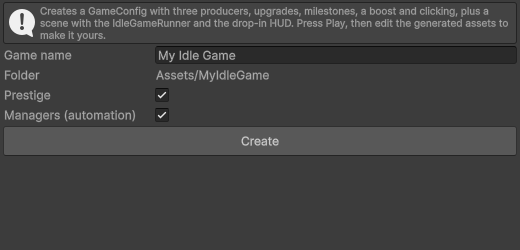
- Create Type a name and press Create.
- Press Play Tap, buy, unlock, hire managers, watch a (simulated) ad for a boost.
The wizard creates a folder with a GameConfig, three producers with milestones, upgrades, manager hires,
a boost, clicking, and a scene containing the IdleGameRunner, PrestigeModule,
AutomationModule, SimulatedRewardedAdProvider and the HUD prefab. Edit those assets to make
the game yours.
By hand
- Resources for each currency or material (e.g. Coins, Ore).
- Producers for each producer. Set its Output, and Inputs if it converts one resource into another.
- Upgrades and boosts Optionally and Boost.
- Game config and add everything to its lists. Set a Click Resource for tapping.
- Runner Create an empty GameObject, add
IdleGameRunnerand assign the config. - UI Drag
Runtime/UI/Prefabs/IdleFactoryHUDinto the scene (or build your own UI, see Drop-in UI). - Press Play
Open the config's inspector and press Open in Idle Factory window to check it for mistakes.
What is in the package
HardArtcore/IdleFactory/
├── Runtime/
│   ├── Core/            Plain C# engine (no UnityEngine): IdleGame, GameDefinition, GameState, EconomySimulator
│   ├── Config/          ScriptableObjects: GameConfig, ResourceDefinition, ProductionNodeConfig, UpgradeDefinition, BoostDefinition
│   ├── UI/              Drop-in uGUI components and prefabs (needs uGUI/TextMeshPro)
│   ├── Notifications/   OfflineNotificationModule (needs Mobile Notifications)
│   └── ...              IdleGameRunner, save storages, PrestigeModule, AutomationModule, rewarded-ad bridge
├── Editor/              Config Inspector window, New Idle Game wizard
├── Samples/
│   ├── FactoryDemo/     Production-chain demo with validation tools (UI Toolkit)
│   └── TycoonDemo/      Business-tycoon demo built from the drop-in UI (uGUI)
├── Tests/               Edit-mode and play-mode tests
└── Documentation/       Documentation and changelog
Each folder is its own assembly definition, so you can delete any optional part (UI, notifications, samples, tests) without touching the rest.
Core concepts
Resources
A ResourceDefinition is anything that can be counted: coins, ore, gems. It has an Id (used in
save files, so keep it stable), a display name, icon, color, a starting amount and an optional cap
(MaxAmount, 0 = unlimited). Production that would exceed the cap is lost.
Production nodes
A ProductionNodeConfig produces BaseOutputAmount of its Output every
BaseProductionTime seconds, consuming its Inputs per cycle. A node without inputs is a generator.
- Order is automatic
- Producers always run before the nodes that consume their output, whatever order you list them in.
- Waiting for inputs
- A node that finished a cycle but lacks inputs waits with one cycle ready ("blocked") and does not store up extra cycles, so there is no burst when inputs return.
- Unlocking
StartsUnlocked, or payUnlockCost.- Levels
- Pay
LevelCost(price =BaseCost × Growth^level). Each level above 1 addsOutputPerLevelof the base output (1= output grows linearly with level, like most tycoon games).MaxLevel0 = unlimited. - Milestones
- Permanent bonuses at level thresholds, e.g. level 25 doubles speed. An effect with an empty target applies to the node itself.
Formulas, per node:
cycle time      = BaseProductionTime / Speed
output / cycle  = BaseOutputAmount x (1 + OutputPerLevel x (level - 1)) x Output
inputs / cycle  = input amount x InputCost
unlock & level prices x PurchaseCost (of that node)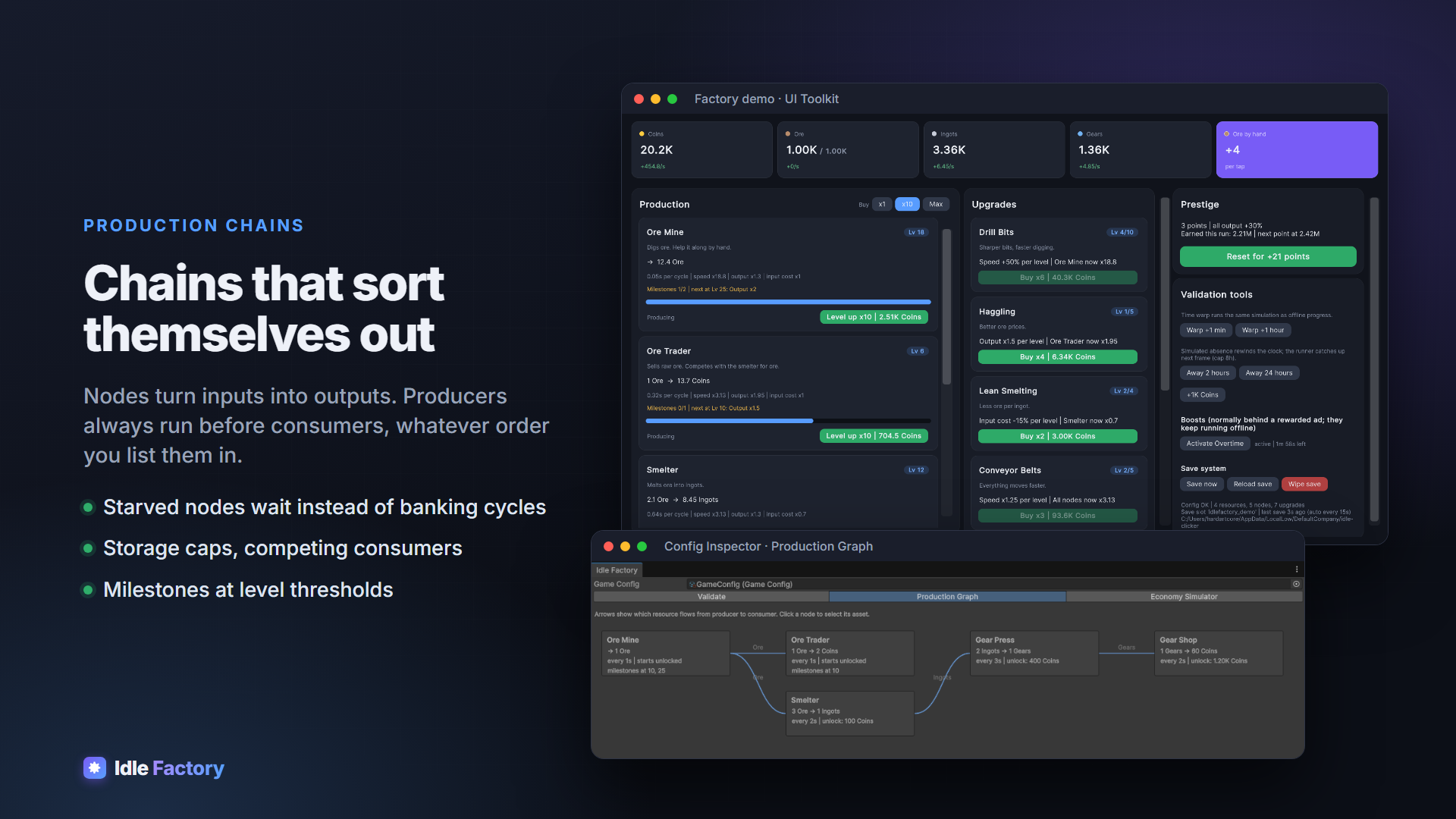
Upgrades and effects
An UpgradeDefinition is bought in levels like a node (price curve, max level) and carries a list of effects. Every bonus in the system (upgrades, milestones, boosts, prestige) is an effect:
| Field | Meaning |
|---|---|
| Stat | Speed, Output, InputCost, PurchaseCost or ClickPower |
| Op | Add: +PerLevel per level (0.1 = +10%). Multiply: × PerLevel per level (2 = doubles each level) |
| Target | A node, or empty for every node (upgrades, boosts). Milestones: empty = their own node |
All effects on a stat combine as (1 + sum of Add) × product of Multiply, floored at 0. Milestones,
boosts and code-added modifiers count as level 1. To make something cheaper use a negative Add
(-0.1 = 10% cheaper per level) or a Multiply below 1. Upgrade prices use the game-wide
PurchaseCost.
Boosts
A BoostDefinition applies its effects for DurationMinutes. Activating it again adds time,
capped at MaxDurationMinutes (0 = no cap). Boosts keep running during offline catch-up and survive
prestige. They are usually granted by rewarded ads.
Clicking
Set Click Resource and Click Amount on the GameConfig. Each IdleGame.Click() adds
ClickAmount × ClickPower; with CritChance (0..1) it is multiplied by
CritMultiplier. Leave Click Resource empty for a pure idle game; the HUD hides its tap button.
Offline progress and time
The game remembers when the simulation was last up to date (GameState.LastSeenUtc). On startup, and
whenever the real clock jumps more than 2 seconds ahead of it (app resumed on mobile, laptop woke up, editor
paused, long freeze), the runner simulates the missed time:
- capped at the config's Max Offline Hours;
- using the same simulation as live play, in 1-second steps, so offline earnings always match what playing would have produced, including resource caps, input shortages, boosts running out and managers buying;
- the result is an
OfflineReport(seconds simulated, gain per resource) passed toIdleGameRunner.OfflineProgressAppliedand kept inIdleGameRunner.LastOfflineReport.
IdleGame.Advance(seconds) runs the same catch-up on demand, e.g. for "time warp" rewards.
IdleGame.ClaimBonus(report, 2) pays a report's gains again once ("watch an ad to double").
Offline time comes from the device clock by default. Set IdleGame.NowUtc to a function returning
server time (Unix seconds) to prevent players from moving their clock forward. Moving it backwards earns nothing.
Saving
- The runner autosaves every
AutoSaveIntervalseconds, when the app is paused (mobile) and on quit. - The whole save is one
GameStateobject as JSON. Content is matched by Id when loading, so you can add, remove and reorder resources, nodes, upgrades and boosts in updates without breaking saves. - Storage: files in
Application.persistentDataPath/<SaveKey>.json(written to a temp file, then swapped in; the previous save is kept as<SaveKey>.bak.json). On WebGL, PlayerPrefs. - Corrupt saves are never overwritten silently: the unreadable file is copied to
<SaveKey>.corruptand the backup is loaded instead. - Tamper detection: set Signing Secret on the runner to sign saves (HMAC-SHA256). Edited saves are rejected and the backup is used.
- Cloud saves or encryption: subclass
IdleGameRunnerand overrideCreateStorage()to return your ownISaveStorage(Load,Save,Deleteof a string by key). - Renaming Ids: override
MigrateSave(GameState); it runs for every save before it loads. Rename entries inResourceIds,Nodes[i].Id,UpgradeIdsorBoostIdsthere (renaming an Id that is not present is harmless). To migrate other data, keep your own version marker in a module's save data. - Multiple slots: set
IdleGameRunner.SaveKey.
The signing secret ships in your build, so it deters casual editing; it is not real security. Turning it on
later invalidates existing unsigned saves unless you construct SignedSaveStorage yourself with
acceptUnsigned: true.
Modules
Modules are components placed next to the IdleGameRunner. They are ticked by the simulation (so they
also work during offline catch-up) and save their own data.
- PrestigeModule
- Resets progress for permanent points. Points =
floor(sqrt(earned this run / Threshold))of the measured resource; each point addsOutputBonusPerPointto all output. CallPrestige()from UI (the HUD's Prestige tab does). - AutomationModule
- Managers. List
Node+HiredBy(an upgrade; empty = hired from the start). Hired, enabled managers unlock and level their node whenever it is affordable, spending at mostBudget Shareof the funds per round so the player keeps a reserve. Players can toggle each manager (the node card's manager button). - OfflineNotificationModule
- Needs Mobile Notifications. When the app goes to the background on Android or iOS it schedules "production stopped" for the moment offline earnings hit the cap, plus an optional reminder. Everything is cancelled when the player returns. On other platforms and in the editor it does nothing, so the same scene builds everywhere.
Your own module
Implement IIdleModule:
using HardArtcore.IdleFactory;
using UnityEngine;

public class DailyGiftModule : MonoBehaviour, IIdleModule
{
    [SerializeField] ResourceDefinition _currency;
    IdleGame _game;
    long _lastClaimDay;

    public string Id => "daily_gift";
    public void Initialize(IdleGame game) => _game = game;
    public void Tick(double deltaTime) { }
    public string Save() => _lastClaimDay.ToString();
    public void Load(string data) => _lastClaimDay = data == null ? 0 : long.Parse(data);

    public bool CanClaim => _game.NowUtc() / 86400 > _lastClaimDay;

    public void Claim()
    {
        if (!CanClaim) return;
        _lastClaimDay = _game.NowUtc() / 86400;
        _game.AddResource(_game.Definition.IndexOfResource(_currency.Id), 500);
    }
}
Modules can also add temporary or permanent bonuses with game.SetModifiers("my_source", effects) and
remove them with RemoveModifiers.
Rewarded ads
The package does not bundle an ad SDK. Boost buttons and the offline popup's "x2" button talk to a
RewardedAdProvider on the runner's GameObject:
using System;
using HardArtcore.IdleFactory;

public class MyAdProvider : RewardedAdProvider
{
    public override bool IsReady => /* your SDK: is a rewarded ad loaded? */ true;

    public override void Show(Action<bool> onFinished)
    {
        // Show the ad with your SDK (LevelPlay, Unity Ads, AdMob...) and call
        // onFinished(true) only when the player earned the reward, onFinished(false) otherwise.
    }
}
SimulatedRewardedAdProvider waits one second and grants the reward (untick Grant Reward to
test skips). Replace it before release. Without any provider, boosts and the bonus are free.
Drop-in UI (uGUI + TextMeshPro)
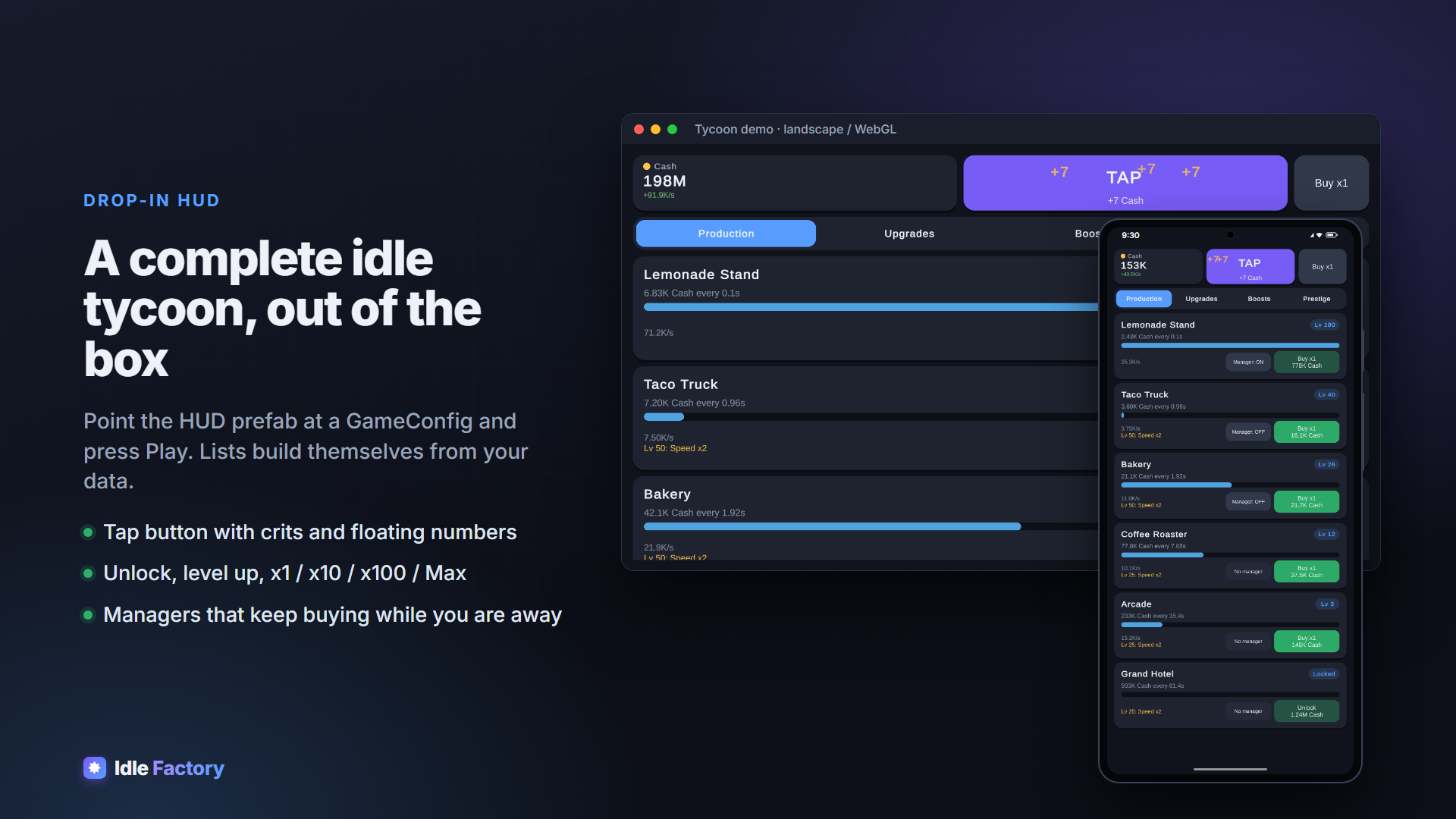
Runtime/UI/Prefabs/IdleFactoryHUD is a complete HUD for phones and browsers: resource bar, tap button
with floating numbers, x1/x10/x100/Max toggle, and Production / Upgrades / Boosts / Prestige tabs, plus the
welcome-back popup. Its lists fill themselves from the runner's GameConfig. Restyle the prefabs freely; every
reference on the components is optional except the asset itself.
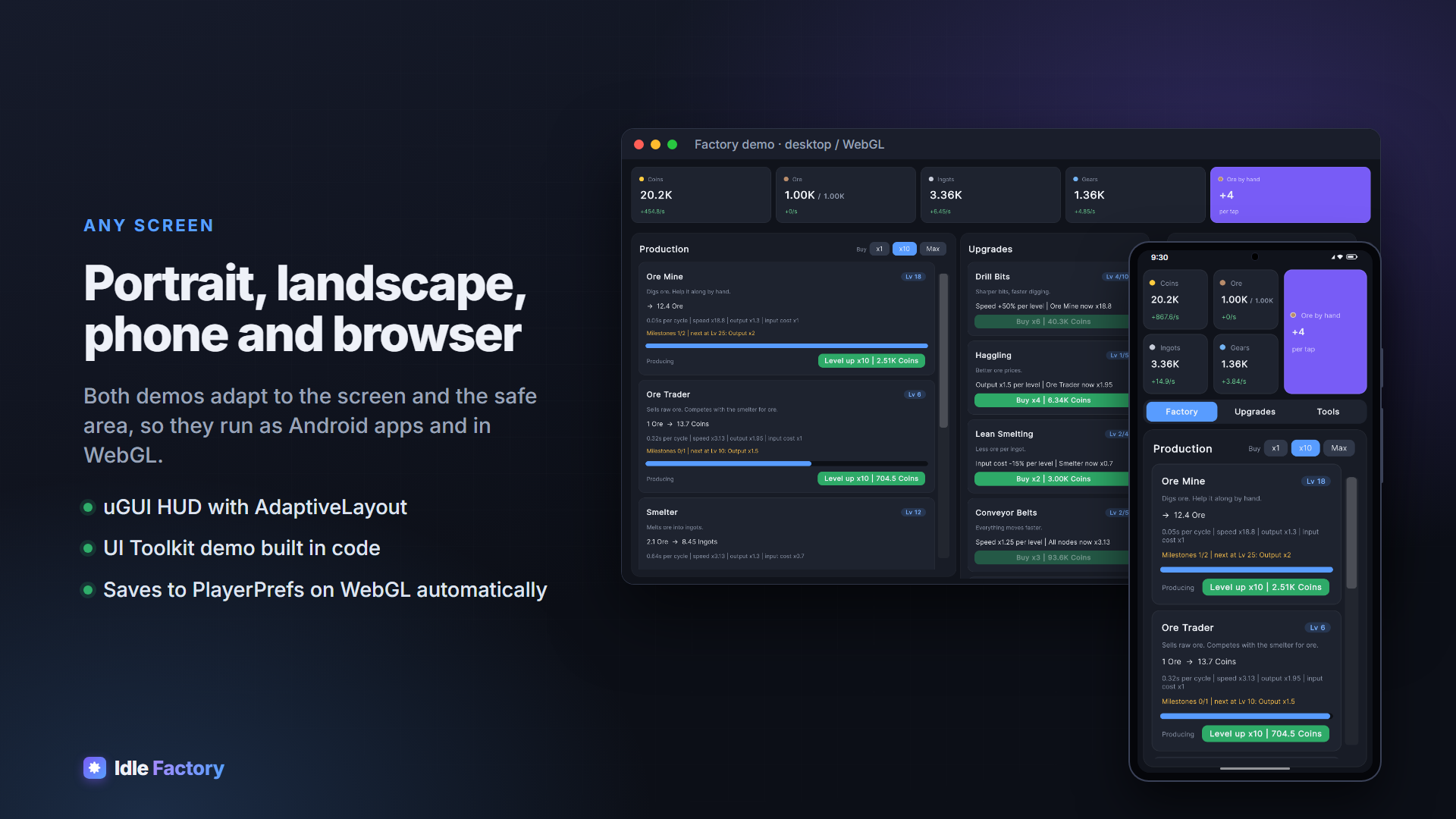
The HUD adapts to the screen: AdaptiveLayout keeps it inside Screen.safeArea (notches,
gesture bars) and stacks one compact header row (resources, tap button, buy mode) above the tabs on every screen
(phones, desktop, WebGL). Cards and buttons use Runtime/UI/Sprites/RoundedRect.png, a 9-sliced sprite
whose corner radius you set per Image with Pixels Per Unit Multiplier (radius = 48 / multiplier).
| Component | Shows / does |
|---|---|
ResourceView | Amount, cap, per-second rate, name, icon |
NodeView | Name, level, recipe, progress, status, unlock/level button, next milestone, manager toggle |
UpgradeView | Name, description, level, effect, buy button (optionally hidden when maxed) |
BoostView | Effect, time left, "watch ad" button |
PrestigeView | Points, bonus, progress to next point, reset button |
ClickButton + FloatingNumbers | Tapping with rising "+12" / "CRIT" numbers |
OfflinePopup | Welcome-back earnings and the "watch ad: x2" bonus |
BuyModeButton | Cycles the shared purchase amount (BuyMode.Count) |
IdleListSpawner | Spawns one view prefab per resource, node, upgrade or boost |
IdleTabs | Minimal tab bar |
AdaptiveLayout | Safe area + header row stacked above the content |
EnsureEventSystem | Adds an EventSystem with the right input module (legacy or Input System) |
Your own widgets
Subclass IdleView, override OnBound() (once, when the game exists) and Refresh()
(every frame), and use Game, Config and Runner. Views find the runner through
IdleGameRunner.Instance, so they work in any scene as long as a runner exists.
Prefer UI Toolkit? The Factory demo builds its whole UI in code with UI Toolkit; use FactoryDemoUI.cs
as a reference.
Editor tools
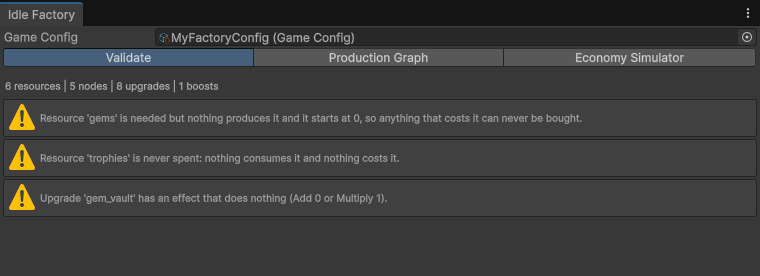
(or the button on any GameConfig):
- Validate
- Errors that stop the game from starting (missing outputs, duplicate Ids, resources not listed in the config, invalid prices) and design warnings: resources nothing produces but something costs, resources never spent, production loops, effects that do nothing.
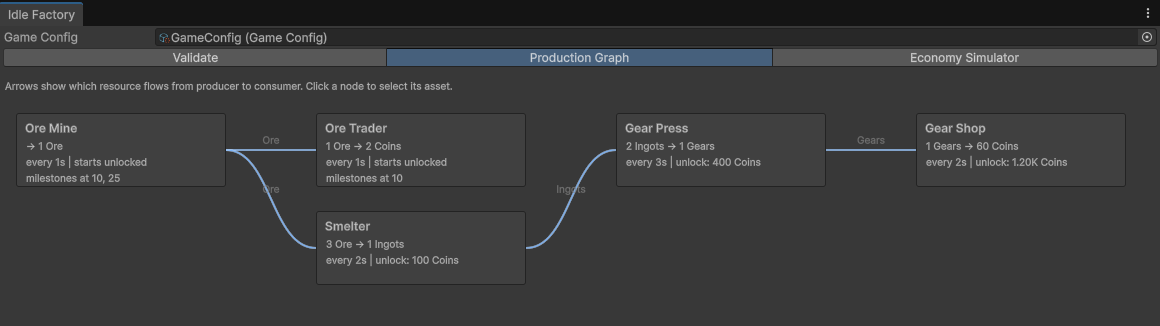
- Production Graph
- Every node laid out by chain depth with resource flows; click a node to select it.
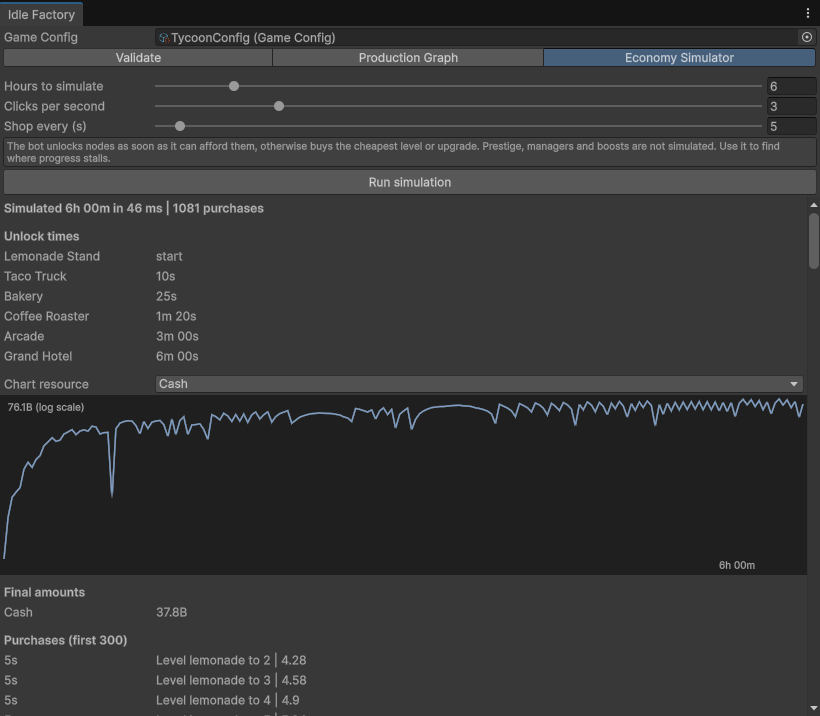
- Economy Simulator
- Plays your config for up to 48 hours in a fraction of a second with a simple bot (unlock when affordable, otherwise buy the cheapest level or upgrade; optional clicks per second). Shows when each node unlocks, a log-scale chart per resource, final amounts and every purchase. Use it to spot where progress stalls before playtesting. Prestige, managers and boosts are not simulated.
opens the starter wizard from the Quick start.
Scripting
Get the game from the runner: var game = IdleGameRunner.Instance.Game;. Everything is addressed by
index, matching the GameConfig lists (config.IndexOf(asset), or
game.Definition.IndexOfResource("coins")).
| Area | API |
|---|---|
| Resources | GetAmount(r), AddResource(r, amount) (respects caps) |
| Nodes | CanUnlock, TryUnlock, LevelUpCost(n, count), MaxAffordableLevels, TryLevelUp(n, count), CycleTime, OutputPerCycle, IsBlocked |
| Upgrades | GetUpgradeLevel, UpgradeCost(u, count), MaxAffordableUpgrades, TryBuyUpgrade(u, count) |
| Boosts | ActivateBoost, IsBoostActive, BoostTimeLeft |
| Clicking | Click() returns amount and whether it was critical |
| Time | Advance(seconds), ApplyOfflineTime(), ClaimBonus(report, multiplier), NowUtc |
| Bonuses | GetStat(stat, node) (node -1 = game-wide), SetModifiers(source, effects), RemoveModifiers(source) |
| Modules | AddModule, GetModule<T>() |
| State | Save(), Load(state), ResetProgress() (prestige), State |
| Events | Changed (every frame and after any change), NodeUnlocked, NodeLevelChanged, UpgradeBought, MilestoneReached, BoostStarted, BoostEnded, Clicked, Produced (live play only), ProgressReset |
Runner: Instance, Game, Config, SaveKey, Save(),
Reload(), DeleteSaveAndRestart(), LastOfflineReport,
OfflineProgressApplied, and the overridable CreateStorage() and MigrateSave().
The engine itself (Runtime/Core) has no Unity dependency. You can build a GameDefinition in
code, run new IdleGame(definition) on a server to validate progress, or unit-test your economy outside
Unity.
Demos
Both demos save to their own slot, so they never touch your game's save.
- Tycoon
Samples/TycoonDemo/TycoonDemo.unity(uGUI). Six businesses with milestones, managers hired via upgrades, tapping with crits, two ad boosts, prestige ("investors") and the welcome-back popup. It is built entirely from the drop-in prefabs and shows what you get without writing UI code.- Factory
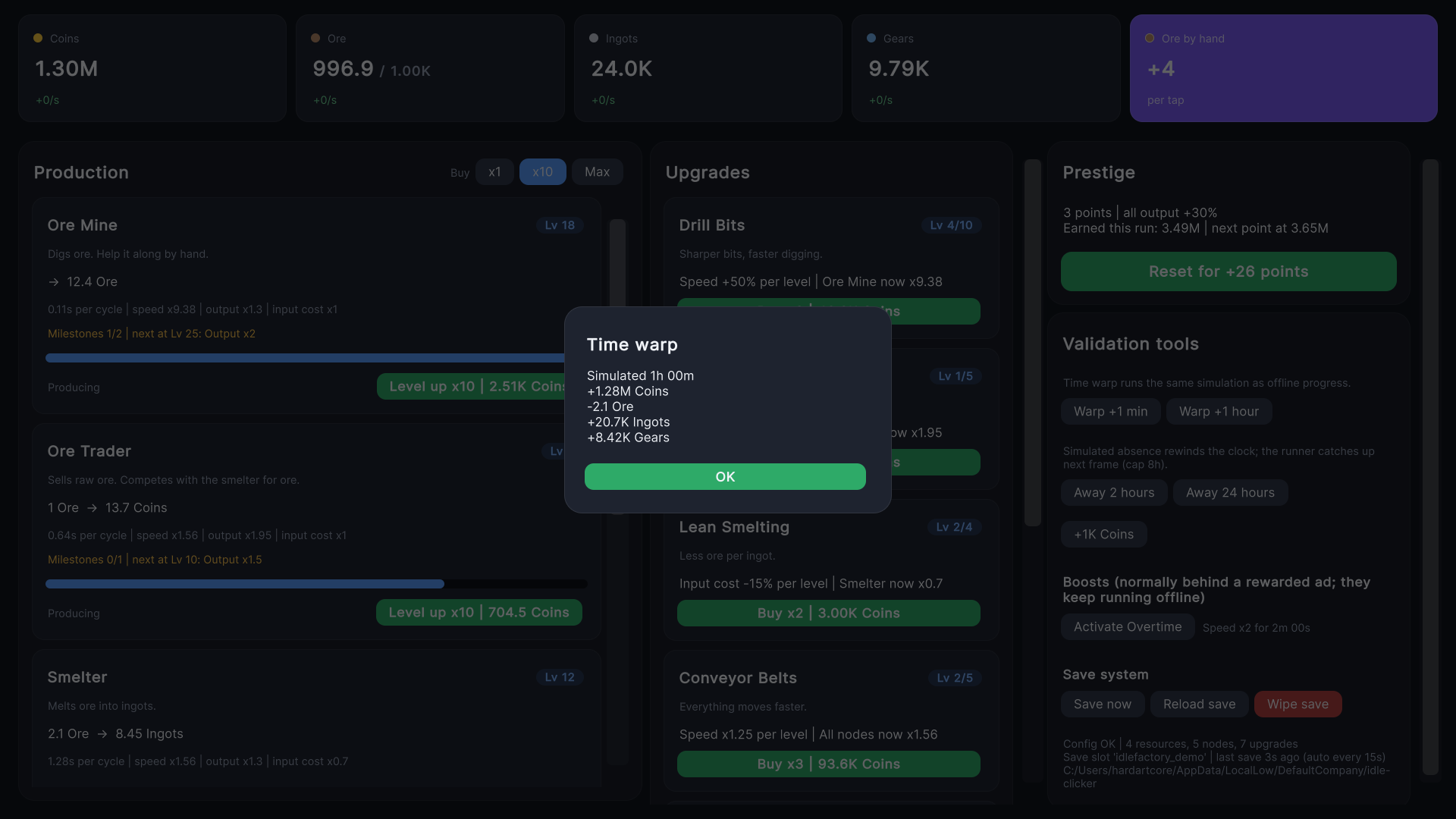
Samples/FactoryDemo/FactoryDemo.unity(UI Toolkit). A production chain where nodes compete for ore, with every upgrade type, milestones, a boost and prestige. Its Validation tools panel lets you check the engine by hand: time warp (+1 min, +1 h), simulated absence (2 h, and 24 h to see the cap), +1K coins, boost activation, and save / reload / wipe with the live save path and autosave timer.
Tests
With the Test Framework installed, lists the package tests: the engine (simulation, offline matching live play, saves and remapping, purchases, effects, milestones, boosts, clicks, the simulator, the linter), the Unity layer (config conversion, file storage, signed saves, managers) and a play-mode test of the runner. Run them after changing the engine; they finish in seconds.
Limits and FAQ
- How big can numbers get?
- Amounts are
double: exact enough for idle games up to about 1e308, with suffixes up to 1e90 and scientific notation beyond. - Is offline progress exact?
- It runs the live simulation in 1-second steps. Results match live play to within a cycle (an included test compares an hour of frame-by-frame play with one hour of catch-up). The cost grows with the number of nodes and steps; for very large configs, lower Max Offline Hours.
- Can I use the Input System only?
- Yes.
EnsureEventSystemadds the Input System UI module when the legacy input manager is disabled. - Enter Play Mode without domain reload?
- Supported: the package's static state resets when play starts.
- Does it work on WebGL?
- Yes; saves use PlayerPrefs there. Gzip builds should enable Decompression Fallback if your host does not serve compressed files.
Release notes
1.0.0
- Engine: resources, production chains with automatic ordering, levels, unlocks, upgrades with stackable effects, milestones, boosts, clicking with crits, prestige reset.
- Offline progress that runs the live simulation, with a configurable cap and catch-up after any pause.
- Saving: id-based loading that survives content updates, atomic files with backup, corrupt-save recovery, optional tamper signing, PlayerPrefs on WebGL, pluggable storage and migrations.
- Modules: prestige, managers (automation), offline notifications.
- Rewarded-ad bridge for boosts and doubled offline earnings.
- Drop-in uGUI + TextMeshPro components and a complete HUD prefab.
- Editor: Config Inspector (validation, design lint, production graph, economy simulator) and New Idle Game wizard.
- Demos: Tycoon (uGUI) and Factory (UI Toolkit, with validation tools). Both adapt to portrait and landscape, so they run as Android apps and in the browser (WebGL).
- Edit-mode and play-mode tests.
Need help?
Questions, bug reports or feature requests: I usually reply within a day.
Last updated October 10, 2026.